One setup.
Your workspace.
The Windows installer includes everything Scrip needs. Choose your project in Connections and review its hook configuration before saving.

YOUR WORK, IN THE LOOP
Your agents keep working. Scrip keeps their questions, requests, and approval rules in view, right on your desktop.
Windows 10/11 · 64-bit · Version 0.2.0
· 33 MB
Python and desktop
dependencies included. No terminal setup.

A SHORTER PATH TO WORK
Open Scrip, connect your Claude Code workspace, and start a new agent session. Your inbox fills from real activity. No sample projects or preloaded conversations.
The Windows installer includes everything Scrip needs. Choose your project in Connections and review its hook configuration before saving.
Read structured questions and permission requests with their workspace and full details. Get desktop notifications when your operating system permits them.
Save a reviewed approval rule for an exact action for 24 hours. Pause rules or remove them whenever you need. Answer questions in your agent.
YOUR DESKTOP COMPANION
Start from an empty inbox. Connect a project deliberately, then see real sessions and requests as they arrive. Scrip stays in your tray when you close its window.
Set up your first connection ↗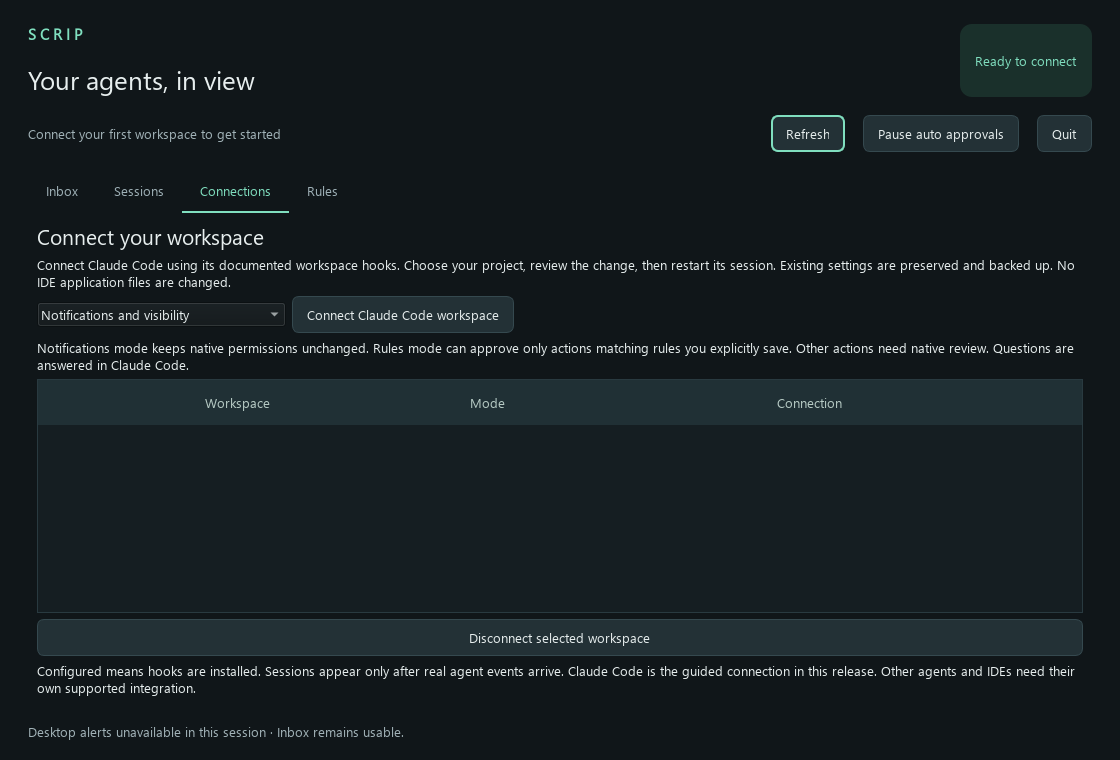
CONNECTIONS IN THIS RELEASE
Guided workspace connection, structured questions, session visibility, and exact permission rules. Available in whichever editor you use to run Claude Code.
Other agents need their own supported integration. Native macOS/Linux installers, mobile access, shipping workflows, and token tools are still being built.
The connection protocol and installed local transport are tested. Live agent-version certification remains outstanding; Scrip does not promise support for every agent, IDE, or version. It never modifies IDE application files.
BEFORE YOU DOWNLOAD
No. Download the Windows setup file, run it, and open Scrip from the Start menu. The installer includes Python and Qt and installs for your user account.
No. In Rules mode, only future calls matching a rule you explicitly saved can be approved automatically. Other requests remain subject to native review. Questions always require your answer in the agent.
Requests, rules, and history stay on your computer. The website distributes the application; it does not receive your agent events. No Scrip account or model API key is required.
This release is unsigned. Windows may show an unknown-publisher warning. Publisher signing and signed updates are not yet available. Download from this site and use the published checksum to verify file integrity.
No. This release is a local desktop companion. Mobile access, remote agent control, additional host connections, and product deployment automation remain future work.

Download Scrip and connect your first workspace.
Download for Windows ↓